


The Realtor.com home value estimator is quick, free, and backed by one of the largest real estate platforms in the U.S. But how accurate is Realtor.com compared to Zillow or Redfin, and is it reliable enough to set a list price?
Our verdict: Realtor.com’s estimator is useful for a ballpark number, but it’s less transparent and less customizable than Zillow or Redfin.
In this review, we’ll explain how the tool works, compare its accuracy to Zillow and Redfin, and show you how the estimates stack up against other sites.
For a final sale price, your best bet is still a local realtor’s free comparative market analysis (CMA), but online tools can help you get a sense of where you stand.
How the Realtor.com home value estimator works
Realtor.com uses an automated valuation model (AVM). An AVM is a computer algorithm that estimates a property’s value from public tax records, recent sales, and property details (beds, baths, square footage, etc.).
All you have to do is put your address into the value estimator. Then, Realtor.com will give you a general estimate of your home’s value, as well as three estimates from independent providers. (This is different from platforms like Zillow or Redfin, which will only provide you with one number.)
Here’s where to find these numbers:
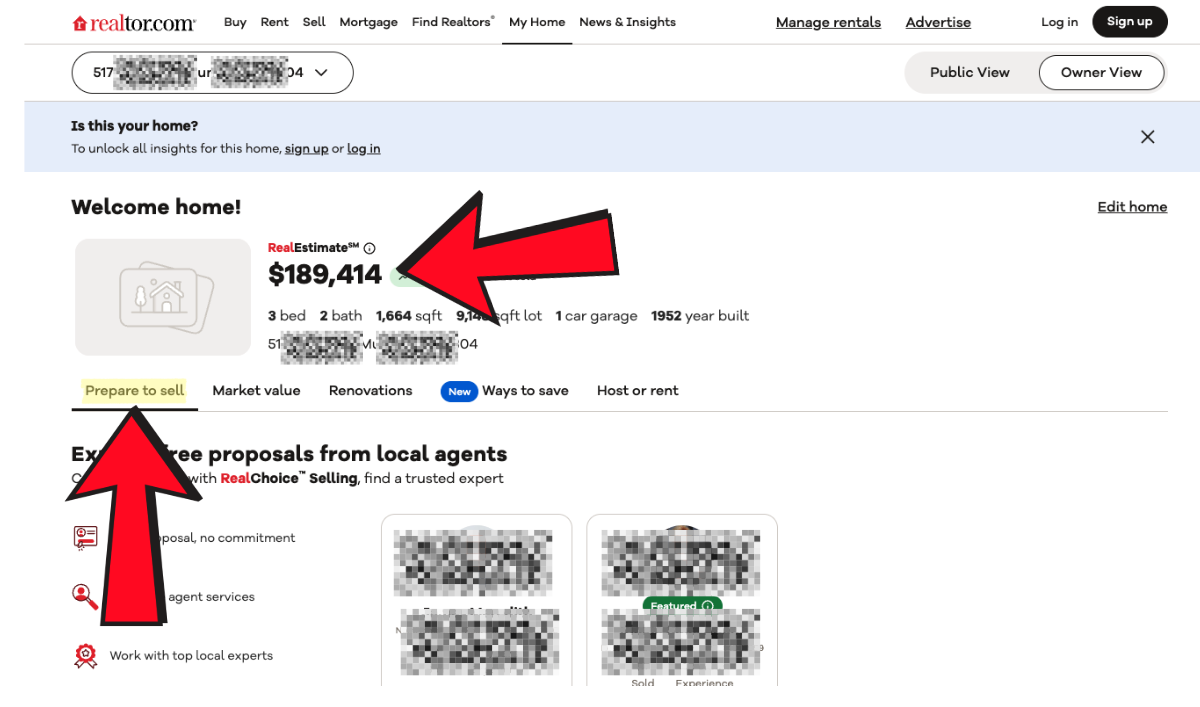
- Prepare to Sell tab: Shows one main “home value” number, which appears to be an average of the three providers.
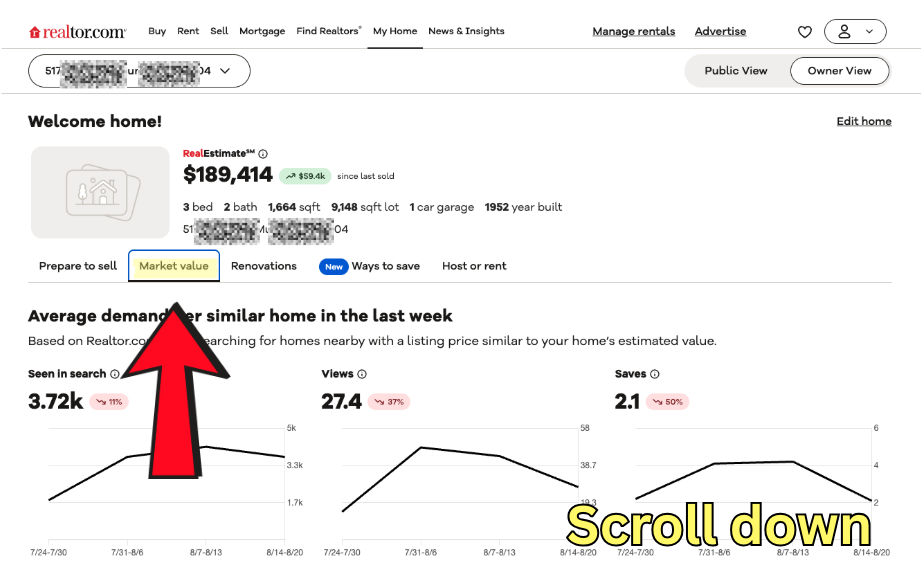
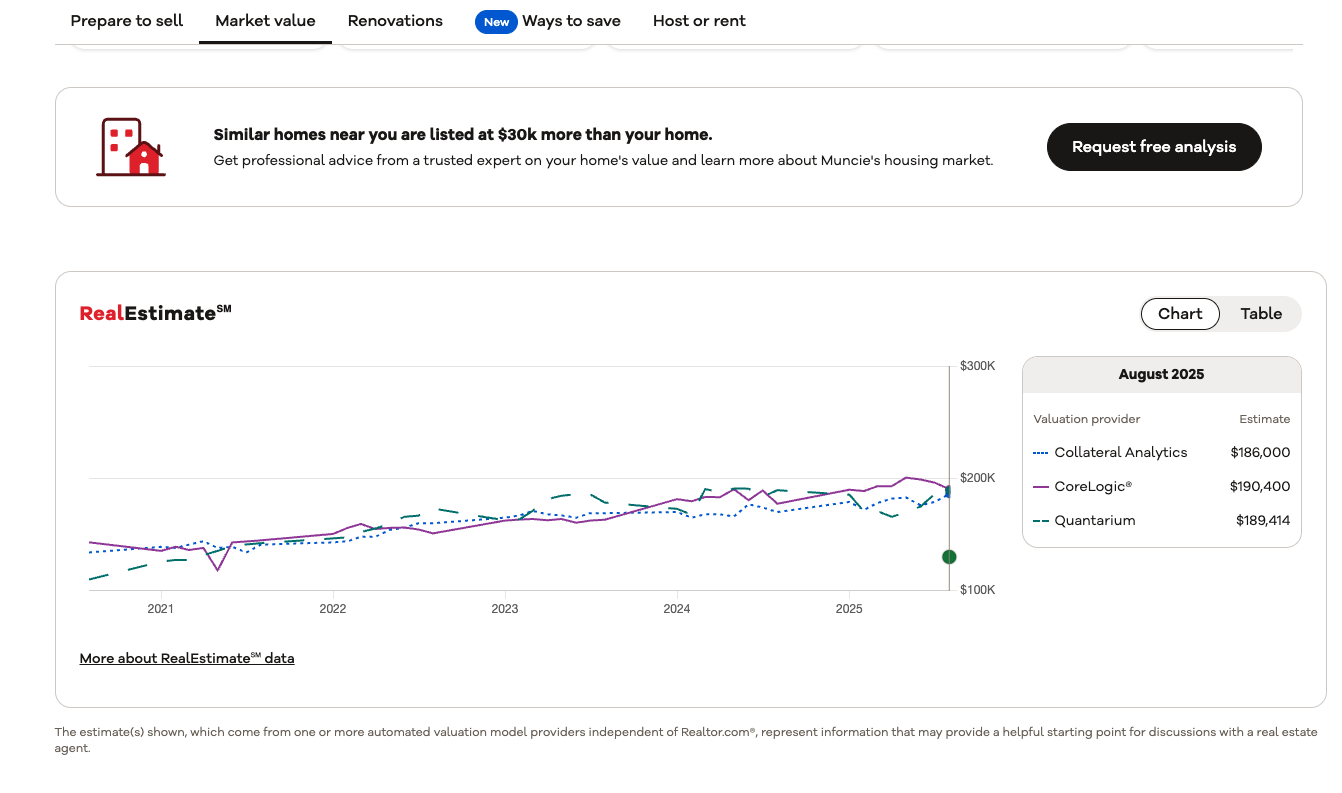
- Market Value tab: Scroll down slightly to view the 3 individual estimates side by side on a line graph.
Here’s who powers the three estimates seen on the line graph:
| Provider | Parent / Ownership | Data Sources | Known For |
|---|---|---|---|
| Collateral Analytics | Black Knight, Inc. | MLS + mortgage industry data | Financial analytics for lenders |
| CoreLogic | Independent data firm | Public records + third-party aggregators | Widely used across real estate + insurance |
| Quantarium | AI company | Proprietary “Quantarium Valuation Model” | Claims higher accuracy with AI-driven modeling |
Each provider uses different formulas, which explains why their numbers vary. For example, one may lean more on recent sales, another on tax assessments.
⚠️ Important
Realtor.com doesn’t reveal which comps or factors were used in the initial estimation. Additionally, while you can update your home’s details to improve the estimation accuracy, you’ll need to register and log in to do that.
Step-by-step guide: How to use the estimator
Using the Realtor.com home value estimator takes less than a minute.
⚠️ Note: To get the full features of the tool as shown here, you’ll need to register and log in.
Step 1: Enter your address
On Realtor.com, click “Home Value,” type in your property address, and hit enter.


Step 2: See the main estimate
On the Prepare to Sell tab, you’ll see one home value number. This isn’t from a single provider, rather it’s an average of three estimates.
Step 3: View individual estimates
⚠️ Note: You will need to be registered and logged in for this.
Switch to the Market Value tab and scroll down a bit to see the three values on a graph (from Collateral Analytics, CoreLogic, and Quantarium).
Step 4: Compare the spread
For our test home, estimates ranged from around $186,000 to $190,000 with an average of about $189,000. That gives you a sense of the range, not just a single figure.
Step 5: Verify and edit details about your home and equity
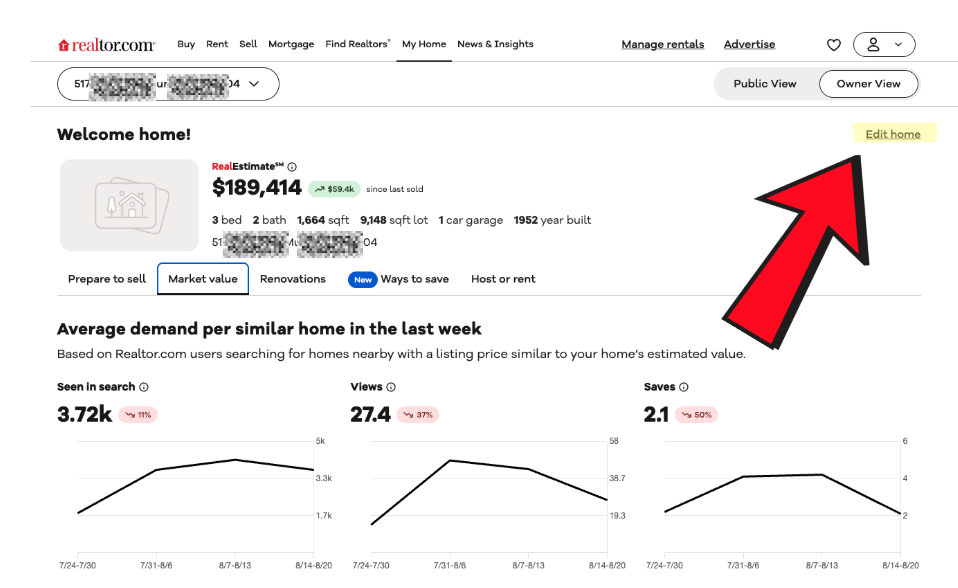
If you click “Edit Home,” you’ll get an opportunity to verify that you’re the owner if you haven’t already. Then, you can edit everything from your home’s square footage, to your mortgage information, to get a clearer picture of your investment.
⚠️ Note: Making these edits will not affect Realtor.com’s public estimation of your home’s value, or the public estimates of the service providers. It will just help you get a better idea of your home’s value personally.
What you’ll get: Three values + an average or median number.
What’s missing: Comps, adjustment options, and renovation data.
How accurate is Realtor.com’s estimator?
Realtor.com does not publish a median error rate, unlike Zillow or Redfin. That lack of transparency makes it harder to judge how reliable its estimates are.
Median error rate is the typical gap between an online estimate and a home’s eventual sale price. For example, Zillow’s 6.9% error rate means a $500,000 Zestimate usually sells for somewhere between $465,500 and $534,500.
- On-market homes (actively listed) tend to be more accurate, since the model can use the list price and fresh comps.
- Off-market homes (not currently listed) rely only on older sales and tax data, so the error rate is higher.
Here’s how the major estimators compare on off-market properties. Note that a lower median error rate means that tool is more accurate.
| Estimator | Median Error Rate (off-market) |
|---|---|
| Zillow | 6.9% |
| Redfin | 7.67% |
| Realtor | N/A |
Without publishing an error rate, Realtor.com may look more precise by offering three estimates, but users can’t tell how accurate those numbers are, and you can’t view the comparable sales behind them.
By contrast, Zillow and Redfin offer more transparency: Zillow lets users view and edit comps, and Redfin explains how it sources its estimates.
Other limitations apply to all AVMs, including:
- No upgrades or renovation data unless in public records
- Lot features (views, additions, unique quirks) often ignored
- Less accuracy in areas with fewer recent sales.
The bottom line is that, compared to Zillow and Redfin, Realtor.com’s tool is less transparent and harder to evaluate.
Comparative table: Multiple home value estimates
To see how the Realtor.com home value estimate compares, we plugged a test property into some of the most popular home value websites. Results ranged from $189,200 to $208,903, with an overall average of $195,059.
Here’s how each provider stacked up against that average:
| Provider | Estimate | % Difference vs. Average |
|---|---|---|
| Chase | $189,200 | –3.0% |
| Zillow | $189,200 | –3.0% |
| Redfin | $208,903 | +7.1% |
| Realtor.com | $189,414 | –2.9% |
| Bank of America | $198,579 | +1.8% |
Analysis:
- Closest to average: Bank of America (+1.8%)
- Low side: Chase, Zillow, and Realtor.com were all about 3% below average
- High side: Redfin was the clear outlier, overshooting by more than 7%
Different sites use different methodologies. Zillow and Redfin rely heavily on recent comparable sales, but their algorithms each weigh comps differently. Bank of America often pulls in older sales and tax records. Realtor.com blends three provider models (Collateral Analytics, CoreLogic, Quantarium). That mix explains why some estimates skew conservative, while others run high.
Realtor.com landed near the bottom cluster, suggesting it may lean slightly conservative compared to Redfin’s more optimistic values.
Why do home value estimates vary?
Home value estimators vary because each uses different data and methods. Key factors include:
- Data sources: Some pull from MLS, others rely heavily on tax records
- Algorithms: Weighting of recent vs. older sales can shift numbers
- Update frequency: Zillow refreshes multiple times a week; others update less often
- Comps used: Some tools lean on nearby active listings, others on sold homes
- Property quirks: Renovations, views, or lot size often aren’t factored in
That’s why estimates for the same home can differ by tens of thousands. Getting multiple estimates and averaging them is more reliable than trusting a single number.
Realtor.com home value estimator: Pros and cons
✅ Pros
- Fast and free: Get a Realtor.com home value estimate in seconds without providing personal info.
- Multiple values: Logged-in users see three estimates (Collateral Analytics, CoreLogic, Quantarium); non-logged-in users only see the average.
- Conservative average: The displayed estimate tends to run modest, which may be closer to what buyers would actually pay.
- Claim your home: Once verified, you can receive ongoing value updates and property info.
❌ Cons
- No transparency: You can’t see the comparable sales behind the numbers, making it hard to judge how accurate Realtor.com is.
- No ability to correct home value estimate: Editing your home’s details won’t change the official number.
- No renovation data: Upgrades or repairs aren’t factored in unless recorded in public data.
Overall, the Realtor.com home value estimate is quick and convenient, but less transparent and flexible than Zillow or Redfin.
How Realtor.com’s estimator compares to others
Here’s how Realtor.com’s home value estimate stacks up against major competitors. Note that “accuracy” is defined as how close an online estimate usually comes to a home’s actual sale price. Lower percentages mean more reliable estimates.
| Estimator | Accuracy (error rate) | Transparency | Customization | Our Rating |
|---|---|---|---|---|
| Zillow | 6.9% | High (view/edit comps) | Moderate — edit facts | ★★★★☆ |
| Redfin | 7.67% | Medium (shows data sources) | Limited — edit facts only | ★★★★☆ |
| Realtor.com | N/A (no error rate published) | Low (no comps shown) | None — edits don’t change value | ★★★☆☆ |
| Chase | N/A | Low (outdated comps) | Some — can edit details | ★★☆☆☆ |
| Ownerly | N/A | Medium | Limited (paid reports only) | ★★☆☆☆ |
| HomeLight | N/A | Very low | None | ★☆☆☆☆ |
Key takeaways
- Zillow is slightly more accurate than Redfin and lets you edit comparable sales — making it the most transparent option.
- Redfin scores well for accuracy, but coverage is smaller and some comps are outdated.
- Realtor.com is convenient and offers three estimates, but lack of error rates, transparency, or customization keep it mid-pack.
- Chase and Ownerly lag behind, with outdated comps or paywalls.
- HomeLight ranks lowest for usefulness.
Overall, Realtor.com’s estimator is better than Chase, Ownerly, and HomeLight, but less robust than Zillow or Redfin if you want transparency or control.
Verdict: Should you use Realtor.com’s estimator?
The Realtor.com home value estimator is a decent starting point if you just want a quick, free ballpark number. But it isn’t detailed or flexible enough to guide a major decision, like setting your home’s list price.
When it’s useful:
- Checking your home’s average estimated value without creating an account.
- Getting three separate estimates (from Collateral Analytics, CoreLogic, and Quantarium) if you register and log in.
Where it falls short:
- No transparency: you can’t see the comparable sales behind the numbers.
- No customization: edits to your home’s details won’t change the official, public estimate — only help you determine things like potential equity and sales price based on your input. And only if you’re logged in.
- No renovation data: upgrades or repairs aren’t included unless reflected in public records.
Compared to Zillow and Redfin, Realtor.com offers multiple data points, but with less transparency and interactivity. Zillow lets you view and edit comps, while Redfin explains more about its methodology. Realtor.com, by contrast, only gives non-logged-in users a single average number, with the full three-provider breakdown hidden behind a login.
For the most accurate estimate, request a free comparative market analysis (CMA) from a local real estate agent. Clever can connect you with a top-rated agent who will prepare a CMA at no cost or obligation.